Prepare Input Files
1. GWAS summary statistics
Guidelines:
Prior to submitting your GWAS summary statistics (hereafter GWAS sumstat) to FUMA SNP2GENE, to avoid error, follow these steps:
Open and view your GWAS sumstat in a bash terminal (or in some editor like notepad++) to get an idea of what columns are present, what the column names are, and what the values look like.
Check the genome build of your GWAS sumstat. Is it in GRCh37 or GRCh38?
If your GWAS sumstat is in GRCh37:
Is there a header?
Is there a column for chromosome? What is the column name?
Is there a column for position? What is the column name?
Is there a column for rsID? What is the column name?
Is there a column for p value? What is the column name?
Warning
Either chromosome and position OR rsID AND p value have to be present
Is there a column for effect allele? What is the column name?
Is there a column for non effect allele? What is the column name?
Is there a column for beta? What is the column name?
Is there a column for odds ratio? What is the column name?
Is there a column for standard error? What is the column name?
Fill in the name of the columns from your gwas sumstat as much as possible, to ensure accuracy and performance:
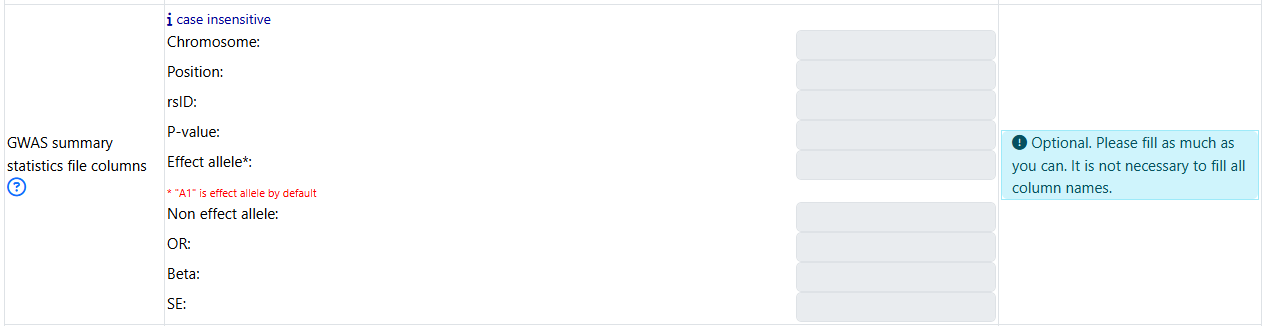
If you choose not to fill in the name of the columns, FUMA tries to detect this based on common naming convention. Check Headers for specifics.
If your GWAS sumstat is in GRCh38:
- if your input GWAS sumstat file contains rsID, you can submit to FUMA by first removing the chromosome and position before submitting to FUMA.
in this case, FUMA will use the provided rsID to look up the chromosomes and positions using dbSNP version 146
Warning
IMPORTANT: make sure to completely remove the chromosome and position (in GRCh38) if present in your gwas sumstat.
- if your input GWAS sumstat file does not contain rsID (and only chromosome and position in GRCh38), you can submit to FUMA if your file:
Contain only 3 columns with the following column names in this order: chromosome, base_pair_location, p_value
Contain 6 columns with the follwing column names in this order: chromosome, base_pair_location, effect_allele, other_allele, beta, p_value
Tip
Use a scripting language such as R or Python to select the columns and rename the column names to be compatible. Make sure to use tab as a delimiter.
Click on option to select GRCh38 in the job submission page:
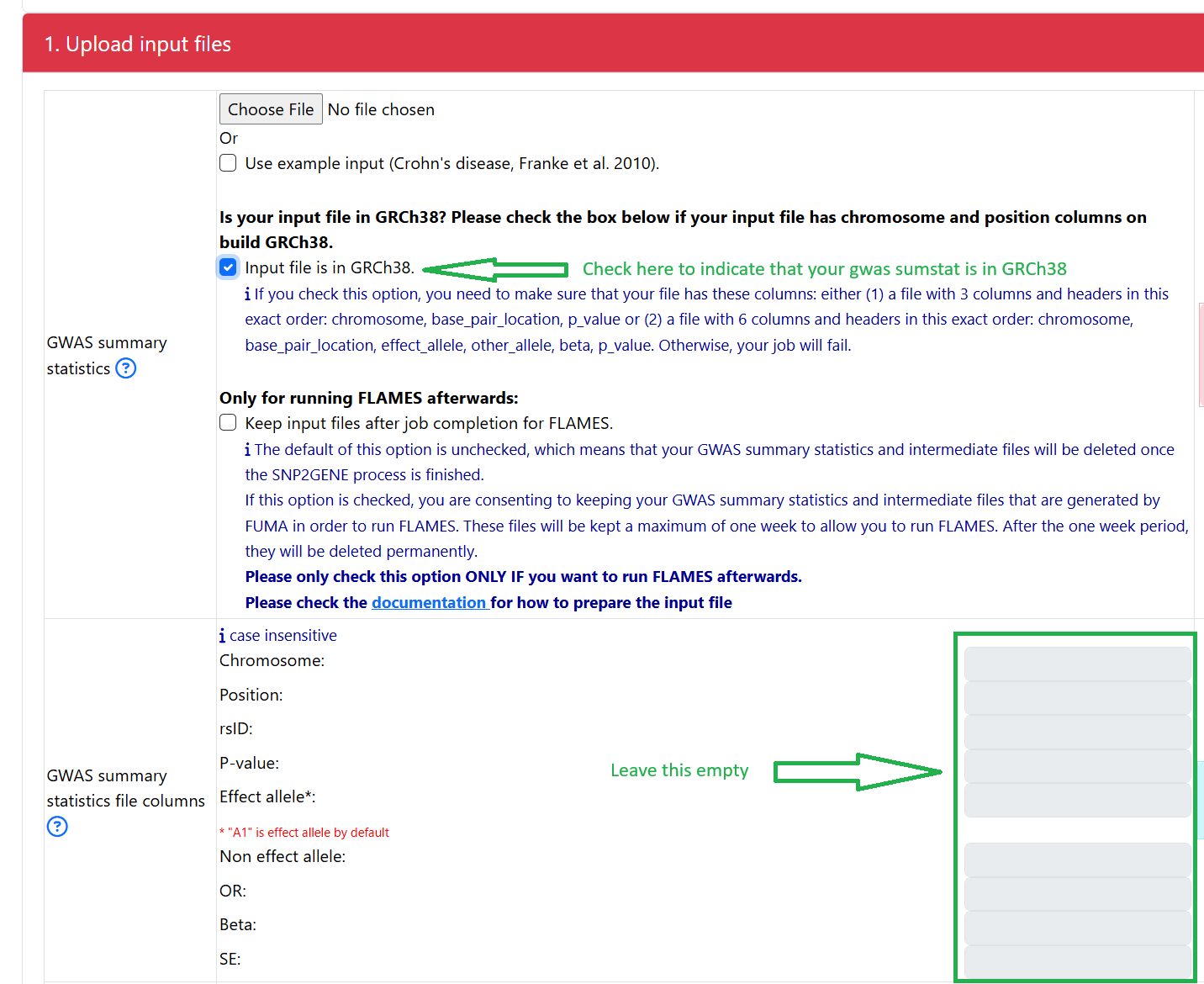
Note
This option is provided as a convenience for users who have GWAS sumstat in GRCh38 and do not want to convert the coordinates to GRCh37 themselves. However, the reference database that FUMA uses is based on GRCh37 and the results would be returned to you in GRCh37 coordinates.
Is there a value for sample size in your gwas sumstat?
If yes, you can put in the name of the sample size column in section 2. For example:

Warning
If you put in NEFF as the name of the column for sample size, and if this column does not exist, your job will fail.
If no, you can put in the value (integer). For example:

Tip
Make sure that there is a header (column name) in the GWAS sumstat.
The header should not start with a comment character (#) because any lines that starts with # will be ignored.
- The number of column names need to be equal to the number of columns in your input file.
if the input file has a row index, this means that there is one fewer column name in the header as compared to when the actual data starts.
to fix this, one needs to save the data specifying index=False (the syntax depends on the specific language)
rsID if exists has to be in rsID format and not chr:pos:a1:a2 format
Use gzip software to compress with .gz extension or ZIP software with .zip extension. Make sure you haven’t renamed the file manually. Use the proper compression software instead.
After gzipping, if your file is still larget than 600Mb, remove unnessary columns
The chromosome has to be numbers between 1 and 23 or X. Any variant with a chromosome name that deviates from 1 to 23 or X will be removed.
Position values have to be integer (not in scientific notation). Position values that are not an interger will be removed.
Make sure that there is no missing data for the columns that are mandatory such as p-values
If you specify the name of chromosome, position, etc… during submission, make sure that these names exist in your input file
Make sure that the delimiter is consistent. In addition, delimiter can be any of white space including single space, multiple space and tab. Because of this, each element including column names must not include any space
Check your file to make sure that there is no quotation around each value. It should be for example 1 instead of “1”. This is usually caused when you save a file in R. To avoid this, one needs to set quote=F when saving a file in R.
Overview
GWAS summary statistics (GWAS sumstat) is a mandatory input of SNP2GENE module.
Every row should contain information for one SNP.
An input GWAS sumstat could contain only subset of SNPs (e.g. SNPs of interest for your study to annotate them), but in this case, results of MAGMA will not be relevant anymore.
Any variants that do not exist in the selected reference panel will not be included in any analyses. The 1000G reference panel is provided in the Download page (https://fuma.ctglab.nl/downloadPage) (scroll to the section Reference panel data).
Note
For indels, both alleles need to be matched exactly with reference panel to be included in the analysis. For example, an indel rs144029872 needs to be encoded with AG/A (the order of alleles does not matter), anything else such as G/- or I2/D will not match with the selected reference panel.
Prepare input GWAS sumstat in ascii txt.
Before submitting, gzip your file:
gzip {gwas/sum/stat}
Below are some more specific information to help with preparing the input GWAS sumstat
Mandatory columns
- The input GWAS sumstat must include:
a column for the p values, a column for the chromosome, and a column for the position OR
a column for the p values and a column for the rsID
The chromosome column can be a string such as “chr1” or just an integer such as “1”. When “chr” is attached, this will be removed in output files.
- Chromosome X can be encoded as chrX, X, chr23, or 23
when chrX or X is used, it will be updated to 23.
Position has to be integer (and not in scientific notation)
Allele columns
Alleles are not mandatory but if only one allele is provided, that is considered to be the effect allele.
When two alleles are provided, the effect allele will be defined depending on column name.
If alleles are not provided, they will be extracted from the dbSNP build 146 and minor alleles will be assumed to be the effect alleles.
Effect and non-effect alleles are not distinguished during annotations, but used for alignment with eQTLs.
Whenever alleles are provided, they are matched with dbSNP build 146 if extraction of rsID, chromosome or position is necessary.
Alleles are case insensitive.
Headers
A header is mandatory
Users have an option to specify the column names of the input GWAS sumstat:
Warning
Only fill in this section if your GWAS sumstat is in GRCh37.
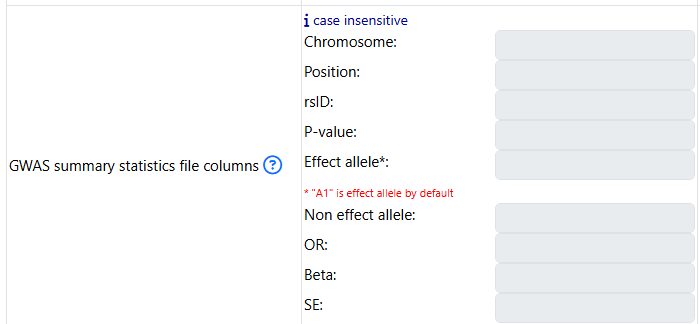
- When users do not specify the column names of the input GWAS sumstat, FUMA automatically detects the columns based on the following headers (case insensitive):
If a column has names snp, snpid, or markername, it will be detected as column for rsID
If a column has names chr, chromosome, or chrom, it will be detected as column for chromosome
If a column has names bp, pos, or position or base_pair_position, it will be detected as column for position (basepair)
If a column has names A1, effect_allele, allele1, or alleleB: it will be detected as the effect allele
If a column has names A2, non_effect_allele, allele2, or alleleA: it will be detected as non-effect-allele
If a column has names P, pvalue, p-value, p_value, or pval: it will be detected as p values
If a column has names OR, it will be detected as odds ratio
If a column has names Beta or be, it will be detected as beta
If a column has names SE, it will be detected as standard errors
Note that any columns with the name listed above but with different element need to be avoided. For example, when the column name is “SNP” but the actual element is an id such as “chr:position” rather than rsID will cause an error.
Extra columns will be ignored.
Rows that start with “#” will be ignored.
Column “N” is described in the parameters section.
- Be careful with the alleles header in which A1 is defined as effect allele by default. Please specify both effect and non-effect allele column to avoid mislabeling.
If wrong labels are provided for alleles, it does not affect any annotation and prioritization results. It does however affect eQTLs results (alignment of risk increasing allele of GWAS and tested allele of eQTLs). Be aware of that when you interpret results.
Delimiter
Delimiter can be any of white space including single space, multiple space and tab. Because of this, each element including column names must not include any space.
2. Pre-defined lead SNPs
This is an optional input file. This option would be useful when 1. You have lead SNPs of interest but they do not reach significant P-value threshold. 2. You are only interested in specific lead SNPs and do not want to identify additional lead SNPs which are independent. In this case, you also have to UNCHECK option of Identify additional independent lead SNPs.
If you want to specify lead SNPs, there are 2 options for the input file: - Option 1: the input file has the following 3 columns:
rsID : rsID of the lead SNPs
chr : chromosome
pos : genomic position (GRCh37)
Note
The order of columns has to be exactly the same as shown above but header could be anything (the first row is ignored).
- Option 2: the input file has 1 column:
rsID
Tip
If you submit your input GWAS summary statistics in GRCh38, submit the pre-defined lead SNPs using the option with just rsID so you do not have to convert the coordinate to GRCh37. Instead FUMA will do this for you.
3. Pre-defined genomic region
This is an optional input file. This option would be useful when you have already done some follow-up analyses of your GWAS and are interested in specific genomic regions. When pre-defined genomic region is provided, regardless of parameters, only lead SNPs and SNPs in LD with them within provided regions will be reported in outputs.
- If you want to analyze only specific genomic regions, the input file should have the following 3 columns:
chr : chromosome
start : start position of the genomic region of interest (hg19)
end : end position of the genomic region of interest (hg19)
Note
The order of columns has to be exactly the same as shown above but header could be anything (the first row is ignored). Extra columns will be ignored.